Welcome New Visitors on Your Homepage
Use the popup to greet visitors shortly after they arrive, introduce your newsletter, and provide an easy way to stay connected with your store.

Show a timely welcome popup with an image, message, newsletter signup form, and social links to introduce your store and encourage visitors to stay connected.
 2.0 Compatible
Newsletter Ready
Mobile Responsive
2.0 Compatible
Newsletter Ready
Mobile Responsive 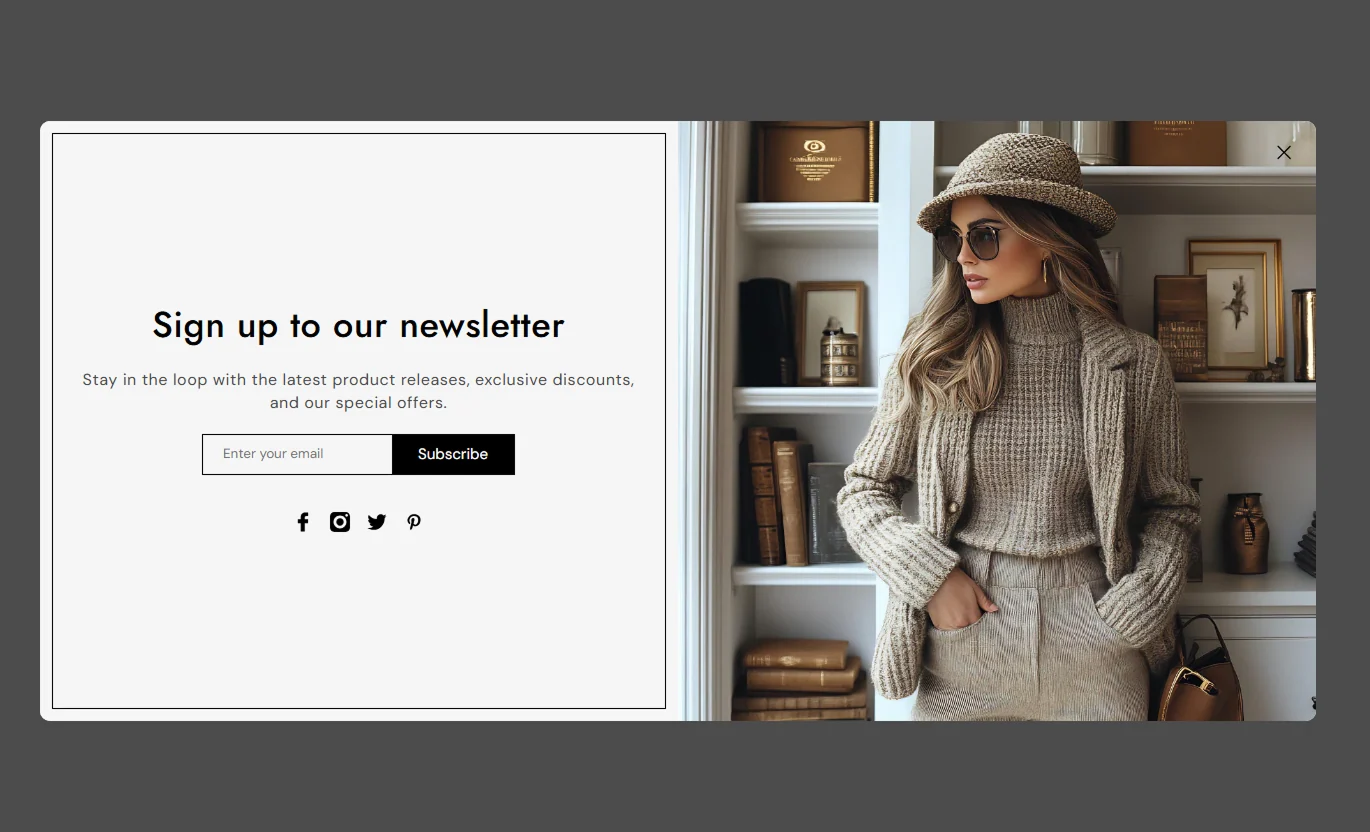


Create an engaging welcome popup with controls for timing, newsletter signup, images, social links, content, and responsive styling.

Choose how many seconds to wait before the welcome popup appears to visitors.

Add an email signup form to collect newsletter subscribers directly through the popup.

Add a heading and supporting content to welcome visitors and introduce your newsletter offer.

Add an image to create a stronger visual introduction and support your store message.

Choose whether the popup image appears on the left or right side of the content.

Add Facebook, Instagram, Twitter, and Pinterest links to connect visitors with your social channels.

Choose how often the popup can appear again after a visitor closes it.

The popup adapts to smaller screens with a stacked layout for easier viewing and interaction.
Control the popup timing, content, newsletter signup, social links, image, and section styling from one place.

Applies to the whole section
Enable or disable the welcome popup.
Popup DisplayShow a popup preview in the theme editor.
Popup PreviewChoose how many seconds to wait before the popup appears.
Popup Display DelaySet how often the popup can appear again after being closed.
Popup Repeat IntervalAdd an image to the welcome popup.
Popup ImageChoose whether the image appears on the left or right side.
Image PlacementAdd the main heading displayed in the popup.
Popup HeadingAdd supporting text below the heading.
Popup ContentSet the maximum width of the popup.
Popup WidthAdjust the corner radius of the popup.
Popup Border RadiusCustomize the popup background color.
Background ColorCustomize the heading and content colors.
Text ColorsCustomize the newsletter button color and styling.
Button StylingEnable and configure social media links.
Social LinksUse the welcome popup to introduce your store, collect email subscribers, share social channels, and create a stronger connection with new visitors.
Use the popup to greet visitors shortly after they arrive, introduce your newsletter, and provide an easy way to stay connected with your store.
Create a welcoming first impressionEncourage newsletter signupsIntroduce your brand messageShare your social media channelsBuild connections with new visitorsDisplay a welcome message while visitors explore collections and give them an easy way to join your email list without interrupting their browsing experience.
Build your subscriber list while visitors browseKeep shoppers connected with your storeIntroduce newsletter updatesShare supporting brand contentEncourage continued engagementUse the popup to invite product-focused visitors to join your newsletter and stay informed about new products, store updates, and announcements.
Turn product visitors into subscribersKeep shoppers connected after browsingSupport ongoing customer communicationShare useful brand messagingConnect visitors with your social profilesAdd a welcome popup to campaign landing pages to introduce your store, collect email addresses, and connect visitors with your social channels.
Create a focused campaign introductionCollect emails from landing page visitorsReinforce your brand messageConnect visitors with social channelsCreate a simple signup opportunityUse a focused welcome popup to introduce your store, collect email subscribers, and give visitors simple ways to stay connected.
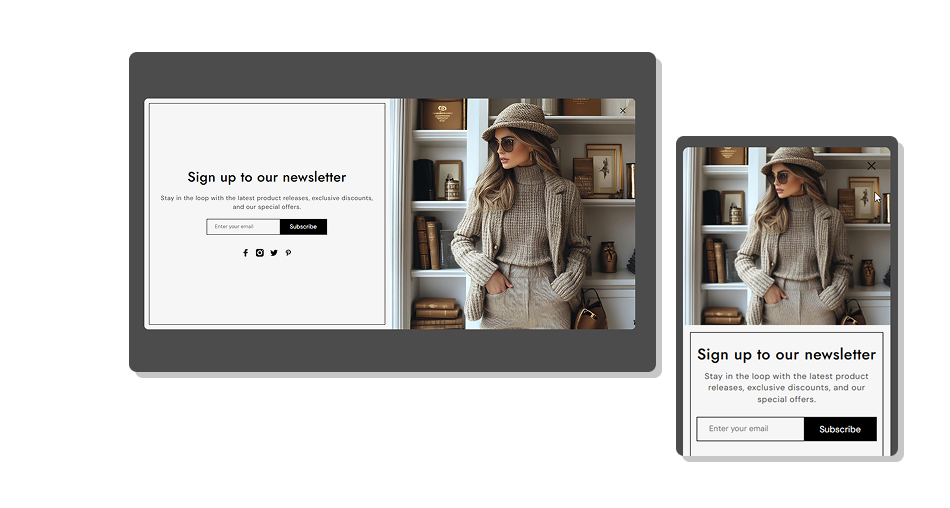
Combine custom messaging, newsletter signup, images, social links, flexible timing, and responsive styling to create a welcome popup that fits your store.
Create a clear welcome experienceCollect newsletter subscribersAdd custom popup messagingShowcase a supporting imageConnect visitors with social channelsControl popup timing and repeat displayCustomize the popup appearanceCreate a responsive experience across devices Use a short message that clearly explains the popup purpose
Choose an image that supports your store and welcome message
Set a delay that gives visitors time to explore the page
Use a clear newsletter button label
Add social links to your active store profiles
Use a short message that clearly explains the popup purpose
Choose an image that supports your store and welcome message
Set a delay that gives visitors time to explore the page
Use a clear newsletter button label
Add social links to your active store profiles  Do not show the popup immediately without a clear reason
Do not use images that distract from the signup form
Do not add lengthy content that is difficult to scan
Do not use unclear button labels
Do not add outdated or unrelated social links
Do not show the popup immediately without a clear reason
Do not use images that distract from the signup form
Do not add lengthy content that is difficult to scan
Do not use unclear button labels
Do not add outdated or unrelated social links Yes. Use the Popup Display Delay setting to choose how many seconds should pass before the popup appears.
Yes. You can add a newsletter signup form with an email field and signup button to collect visitor email addresses.
Yes. You can customize the newsletter button label to match your store's messaging.
Yes. Use the Popup Repeat Interval setting to control how often the popup can appear again after being closed.
Yes. Add an image through the theme editor and choose whether it appears on the left or right side of the popup.
Yes. You can add social links for Facebook, Instagram, Twitter, and Pinterest.
Yes. The popup adapts to smaller screens with a stacked layout so the content remains easy to view and interact with.
Yes. You can customize the popup colors, text styling, button styling, border radius, and maximum width from the theme editor.
For Support or any Questions Email Us: [email protected]
Install SectionHub and add the Welcome Popup section to your theme in minutes - no coding required.
