Lead With Scroll-Driven Collection Campaigns
Use Hero Slideshow Scroll Product Showcase as a homepage hero to present featured collections, seasonal stories, or launches through pinned cards, changing backgrounds, and synchronized copy.

Create a full-screen Shopify hero with pinned desktop card transitions, synchronized backgrounds, collection-linked cards, mobile swiping, slide CTAs, and optional marquee text.
 Pinned Hero Transitions
Collection-Linked Cards
Optional Marquee Motion
Pinned Hero Transitions
Collection-Linked Cards
Optional Marquee Motion 
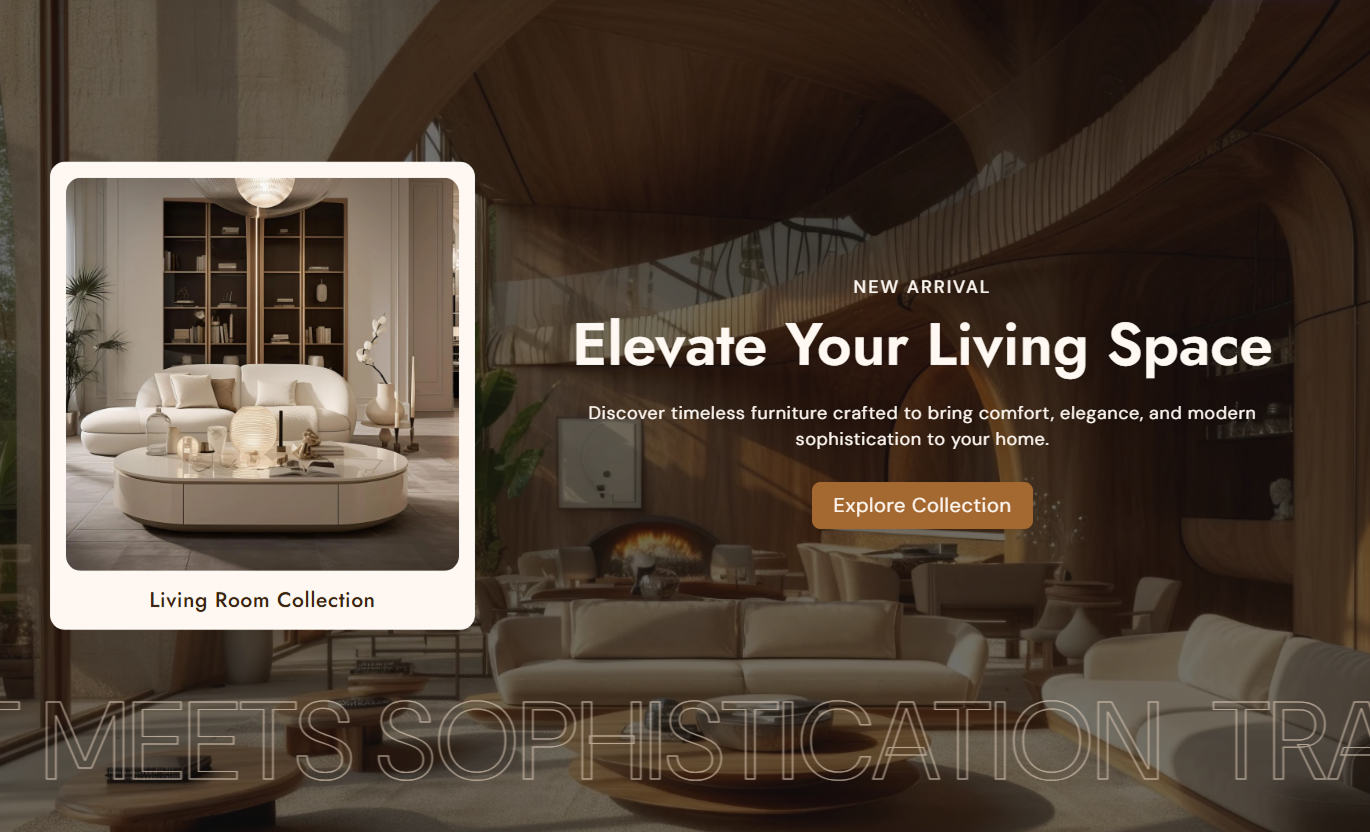


Build a full-screen hero with scroll-driven card transitions, synchronized backgrounds, collection links, mobile swiping, custom CTAs, and marquee motion.

On the desktop, GSAP pins the section and moves each collection card vertically into the active position as shoppers scroll.

Each active card switches the matching background image and text content so visuals, messaging, and navigation stay aligned.

Connect every slide card to a Shopify collection, with custom image and title fields plus collection-based fallbacks.

Below 768px, the desktop scroll animation is removed, and the cards become a centered Swiper that updates active slide content.

Each slide can use its own CTA label, link, outline mode, radius, text colors, backgrounds, borders, and hover states.

Add one marquee block with up to six text entries, repeat them for continuous motion, and pause animation on hover if desired.

Place the content beside the card stack on either side, adjust card media height, and control global text alignment.

Apply one configurable overlay color and opacity across slide backgrounds to improve readability over varied photography.
Control overlay styling, card position, marquee motion, typography, colors, and per-slide collection content.

Applies to the whole section
Set overlay color, opacity, content side, and alignment.
Hero Layout ControlsChoose card media height, radius, and title size.
Collection Card StyleControl marquee position, direction, speed, and hover pause.
Marquee AnimationChoose normal or outline marquee text, then set the weight.
Marquee TypographyAdjust subtitle, heading, content, and marquee text sizes.
Typography ControlsCustomize marquee text color and global overlay styling.
Global Color StylingSet card media size and overall content placement.
Hero Composition
Applies to slide and marquee blocks
Set slide background, subtitle, heading, and rich text.
Slide ContentSet CTA label, link, outline mode, size, and radius.
Slide ButtonSelect a collection plus a custom card image and title.
Collection CardSet slide text, card, button, hover, and outline colors.
Slide ColorsAdd up to six scrolling entries in the Marquee block.
Marquee TextUse this immersive hero across key Shopify pages to feature collections, campaigns, launches, and editorial stories with scroll or swipe-driven transitions.
Use Hero Slideshow Scroll Product Showcase as a homepage hero to present featured collections, seasonal stories, or launches through pinned cards, changing backgrounds, and synchronized copy.
Feature several collections inside one immersive hero experienceKeep active cards, backgrounds, and campaign copy synchronizedUse slide-specific CTAs to guide shoppers to key destinationsAdd marquee text for seasonal messages or campaign phrasesSwitch to centered swipe navigation for mobile shoppersPlace the section on collection templates to highlight related ranges, seasonal edits, or curated destinations with collection-linked cards and animated storytelling.
Highlight related collections without altering the product gridUse collection-linked cards for direct category navigationPair each card with its own background and supporting messageAdd an optional marquee for collection campaign messagingKeep mobile browsing simple with centered swipeable cardsUse the hero on product templates to guide shoppers to related collections, broader categories, or campaign stories, with synchronized imagery, copy, and cards.
Guide shoppers toward related collections and categoriesPair product storytelling with broader collection destinationsUse synchronized backgrounds to reinforce each campaign storyAdd optional CTAs for guides, collections, or campaign pagesPreserve easy card browsing with mobile swipe interactionUse Hero Slideshow Scroll Product Showcase on landing pages to combine collection cards, background changes, slide-specific messaging, CTAs, and optional marquee text into a single experience.
Build a full-screen campaign experience around collection cardsSynchronize each visual card with its own message and backgroundUse slide-specific button styles for different destinationsAdd scrolling marquee text for repeated campaign messagingAdapt desktop scroll storytelling into mobile card swipingTurn featured collections into an immersive hero experience with pinned desktop transitions, mobile swiping, synchronized messaging, and optional marquee motion.
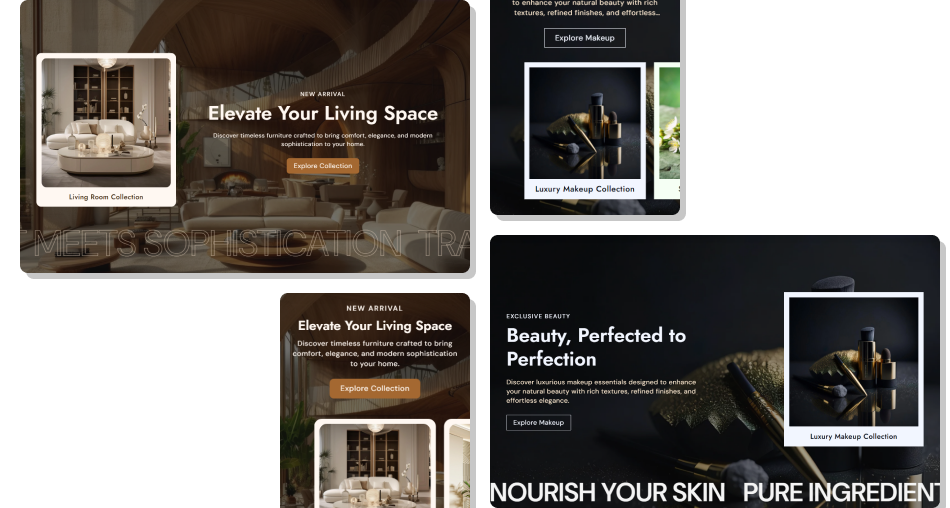
Combine collection cards, synchronized backgrounds, slide content, and responsive motion to guide shoppers through campaigns.
Present up to three collection stories inside a full-screen heroSynchronize active cards with matching backgrounds and slide copyUse scroll-driven desktop transitions for immersive storytellingSwitch automatically to centered Swiper navigation on mobileCustomize each slide's CTA, text, card, and hover color stylingAdd optional marquee messaging with flexible direction and speedUse collection images and titles as fallbacks for card content Use consistent background imagery that supports each slide message
Keep headings and descriptions concise for full-screen readability
Link every collection card to the most relevant destination
Test pinned desktop scrolling and centered mobile swiping
Use marquee text only when it adds useful campaign context
Use consistent background imagery that supports each slide message
Keep headings and descriptions concise for full-screen readability
Link every collection card to the most relevant destination
Test pinned desktop scrolling and centered mobile swiping
Use marquee text only when it adds useful campaign context  Do not use unrelated card images and background images together
Do not overload each slide with long promotional copy or CTAs
Do not leave collection links empty when cards should navigate
Do not set marquee motion so fast that text becomes distracting
Do not rely on desktop scroll behavior for the mobile experience
Do not use unrelated card images and background images together
Do not overload each slide with long promotional copy or CTAs
Do not leave collection links empty when cards should navigate
Do not set marquee motion so fast that text becomes distracting
Do not rely on desktop scroll behavior for the mobile experience The schema allows up to three Slide blocks. Each one can include its own background image, text content, collection card, CTA, and colors.
From 768px upward, GSAP pins the section and moves cards vertically. As each card becomes active, its matching background and text are activated.
Below 768px, the pinned scroll sequence is removed. Cards become centered on Swiper, and slide changes update the matching background and content.
Yes. Each Slide block can select a collection. The card links to that collection, or falls back to the all-collections path when none is selected.
A custom card image is used first, then the selected collection image. The card title uses the custom title first, then the collection title.
Yes. One Marque block can hold up to six text entries. The content is duplicated to enable continuous motion and can optionally pause on hover.
Yes. Every Slide block includes a CTA label, link, outline mode, radius, size, normal colors, hover colors, outline color, and shadow color.
No. The schema disables Hero Slideshow Scroll Product Showcase in Shopify header and footer groups, so it belongs in the supported page-template section areas.
For Support or any Questions Email Us: [email protected]
Install SectionHub and add the Hero Slideshow Scroll Product Showcase section to your theme in minutes - no coding required.
