Guide Shoppers Through Your Main Collections
Use the homepage section to introduce key product categories and provide a visual path to relevant collection pages.

Present Shopify collections in a visual slider with collection images, titles, navigation arrows, responsive scrolling, and a customizable content panel.
 Interactive Collection Slider
Custom Collection Images
Responsive Collection Browsing
Interactive Collection Slider
Custom Collection Images
Responsive Collection Browsing 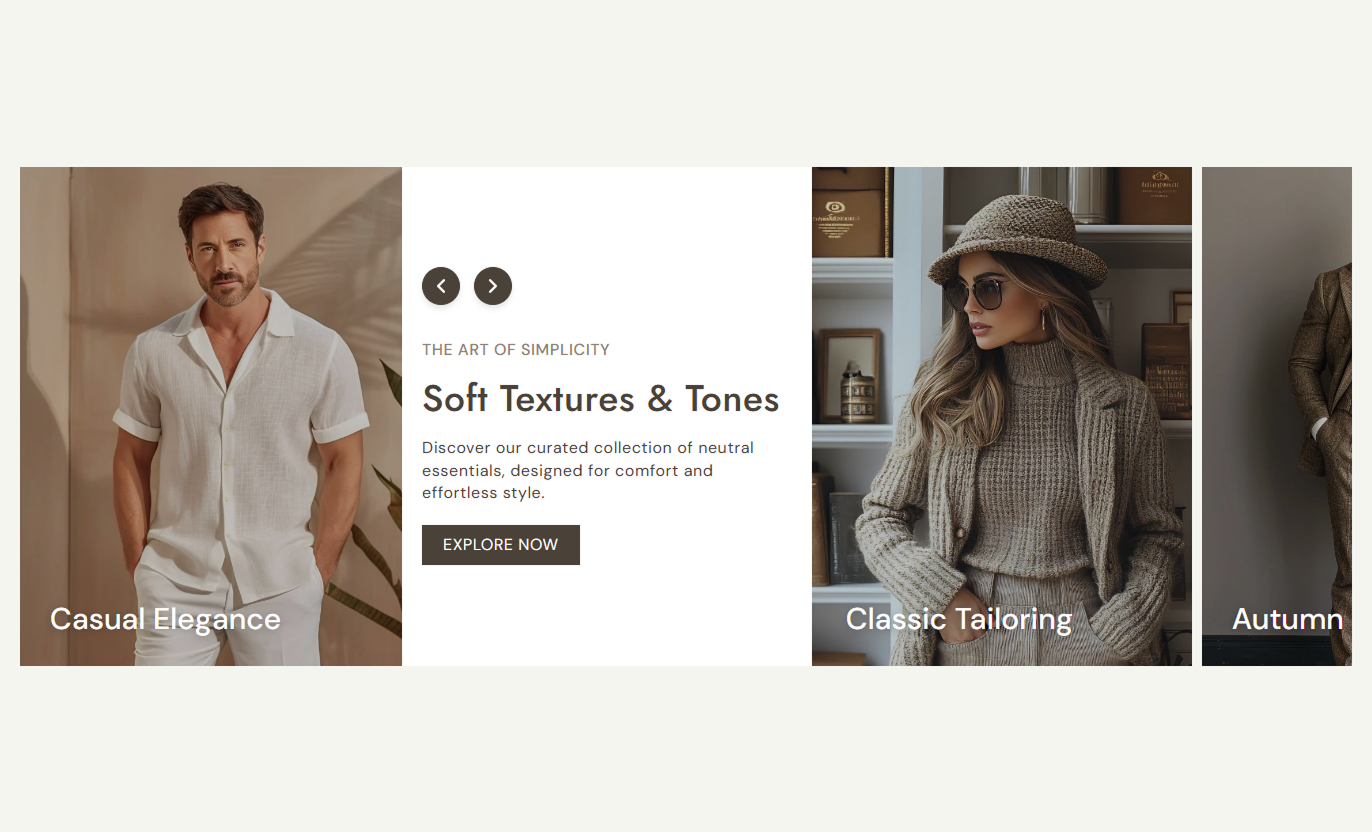



Combine collection links, visual cards, introductory content, navigation controls, and responsive slider behavior in one flexible collection showcase.

Display multiple Shopify collections in a horizontally scrollable slider to make collection discovery easy.

Add custom images for collection cards or use the selected collection's featured image automatically.

Adapt the collection slider for desktop and mobile screens with different slide widths and spacing.

Provide previous and next navigation arrows on larger screens to help shoppers move through collections.

Show a horizontal scrollbar on mobile devices to indicate additional collection cards and support touch-based browsing.

Enable looping automatically when more than four collection slides are available, while shorter lists remain non-looping.

Add a subheading, heading, rich text content, and an optional button next to the collection slider on desktop layouts.

Add a customizable button with a label, link, outline style, border radius, colors, and hover styling.
Control the introductory content, collection cards, slider behavior, typography, colors, buttons, navigation arrows, spacing, and section width from the theme editor.
Applies to the complete section
Add a small introductory subheading above the main heading.
SubheadingAdd the main section heading.
HeadingAdd supporting rich text below the heading.
ContentAdd a button label for the main call-to-action.
Button LabelSet the destination URL for the button.
Button LinkChoose whether the button uses an outline style.
Use Outline ButtonSet the outline button color.
Outline ColorAdjust the button corner radius.
Button Border RadiusControl the desktop button text size.
Button SizeChoose the alignment of the introductory content.
Text AlignmentSet the section background color.
Background ColorSet the background color behind the introductory content area.
Content Background ColorControl the subheading color.
Subheading ColorControl the main heading color.
Heading ColorControl the supporting content color.
Content ColorAdjust desktop and mobile section spacing.
Section PaddingChoose between a full-width or contained layout.
Full WidthSet the maximum width when full width is disabled.
Section Width
Applies to each collection block
Add a custom image for the collection card.
ImageSelect the Shopify collection to display.
CollectionAdd a custom heading for the collection card.
HeadingUse Collection List Fixed Content Slider to organize important Shopify collections into a visual browsing experience that encourages shoppers to explore different product categories.
Use the homepage section to introduce key product categories and provide a visual path to relevant collection pages.
Highlight important collections near the top of the storeCreate a visual starting point for product discoveryGroup related shopping categories in one sectionUse custom collection imagery to strengthen presentationProvide a direct link to each collection pageAdd the section to a collection page to introduce shoppers to related categories, complementary collections, or other product groups.
Recommend related collections alongside current productsHelp shoppers discover additional product categoriesCreate stronger connections between collection pagesUse collection images to make recommendations more visualSupport continued browsing across the storeUse the section on campaign and landing pages to organize selected collections into an engaging visual slider, accompanied by supporting introductory content.
Present campaign-related collections togetherCreate a structured collection discovery areaAdd supporting copy above the collection cardsUse a custom CTA to direct shoppers to another destinationKeep collection navigation visually engagingUse the section to showcase seasonal, promotional, bestselling, or newly launched collections and guide shoppers toward relevant product groups.
Promote seasonal collection groupsHighlight limited-time shopping categoriesCreate a dedicated promotional browsing areaUse custom images to support campaign messagingMake important collection pages easier to discoverCreate a visual collection discovery experience that combines Shopify collection links, custom imagery, responsive sliding, introductory content, and navigation controls.
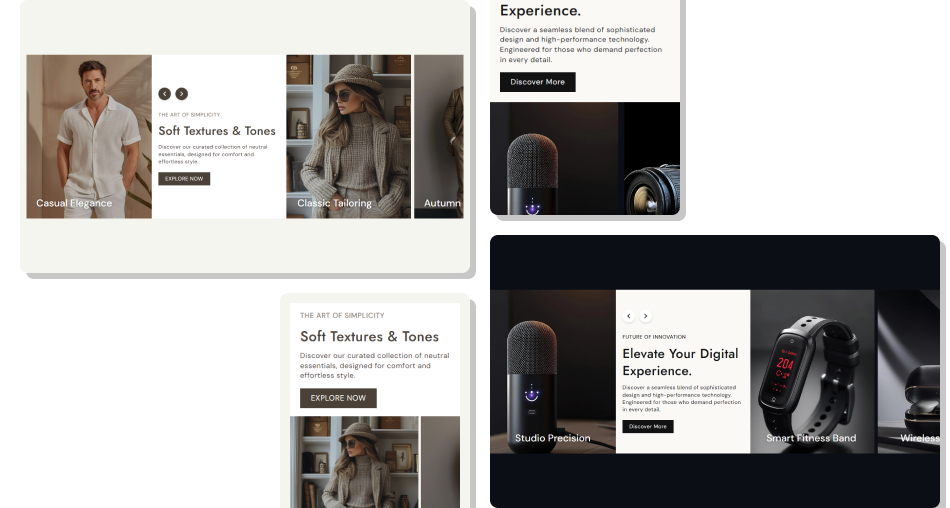
Present your store's important collections in an easy-to-browse slider that gives shoppers a clear visual path to different product categories.
Showcase Multiple CollectionsUse Custom Collection ImageryLink Directly to Collection PagesCreate a Strong Visual LayoutSupport Desktop and Mobile BrowsingAdd Supporting ContentEncourage Continued Shopping Choose collections that match your store's shopping categories
Use clear images that represent each collection accurately
Keep collection titles short and easy to understand
Group related collections together for smoother browsing
Use supporting content that explains the collection selection
Choose collections that match your store's shopping categories
Use clear images that represent each collection accurately
Keep collection titles short and easy to understand
Group related collections together for smoother browsing
Use supporting content that explains the collection selection  Do not add unrelated collections to the same slider
Do not use blurry or poorly cropped collection images
Do not use long titles that become difficult to scan
Do not mix unrelated product categories without clear context
Do not use overlays that make collection titles hard to read
Do not add unrelated collections to the same slider
Do not use blurry or poorly cropped collection images
Do not use long titles that become difficult to scan
Do not mix unrelated product categories without clear context
Do not use overlays that make collection titles hard to read Yes. Each collection block allows you to select a Shopify collection, which can then be linked directly from its collection card.
Yes. You can add a custom image to each collection block. If no custom image is provided, the section can use the selected collection's featured image.
The section does not define a fixed block limit in the provided schema, so multiple collection blocks can be added based on the theme editor's available section limits.
Yes. Desktop users can navigate through the collection slider using previous and next arrow controls.
Yes. The slider is responsive and uses horizontally scrollable collection cards with a scrollbar indicator on mobile devices.
The slider automatically enables looping when there are more than four collection slides. With four or fewer slides, looping is disabled.
Yes. You can adjust the space between slides for mobile devices through the mobile slide spacing setting.
Yes. You can choose the overlay color and adjust its opacity to control how the collection images appear behind their titles.
Yes. You can customize the arrow background color, icon color, border color, and desktop arrow size.
Yes. You can enable the Full Width setting. When disabled, you can specify a maximum section width.
For Support or any Questions Email Us: [email protected]
Install SectionHub and add the Collection List Fixed Content Slider section to your theme in minutes - no coding required.
